BUSINESS FLOW
Name to brand app flow
A business flow in 1 screens, from from a name to a brand to from a name to a brand. Start your app from it, and your agent draws it on your own design system.
- 1 screens
- 5 patterns
- Mobile and desktop
- Brand: Nota (made up)
The screens, in order
- From a name to a brand
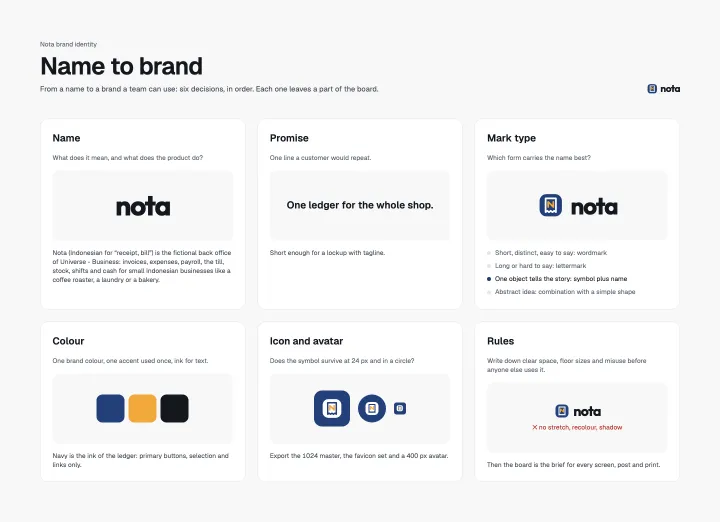
See all 1 screens, at 1440.Pro opens the whole flow in your Universe, with the prompt and code for each screen.
Upgrade to ProAlready Pro? Open in UniverseWhen to use it
USE WHEN
A founder has a name (or a shortlist) and needs a first brand: what it promises, which mark type, colours, the app icon and avatar, and the rules, before the first screen is drawn.
AVOID WHEN
The brand exists already; open its Brand identity board instead.
Patterns and why they work
5 decisions this flow makes, and the clarity each one buys.
Six decisions in a fixed order: name, promise, mark type, colour, icon and avatar, rules
Each decision leaves one part of the brand board, so nothing is skipped
Mark type chosen from the name: short and distinct gets a wordmark, long or hard to say a lettermark, one object a symbol, an abstract idea a combination
A rule a founder can apply without a designer
One brand colour, one accent used once, ink for text
A small palette is easy to keep consistent across screens
Test the symbol at 24 px and inside a circle before committing
Most people first meet the brand as an icon or avatar, not the full logo
Write the rules (clear space, floors, misuse) before anyone else uses the logo
Each pattern also has its psychology, the intuition behind it and what it rules out, plus layout notes for mobile and desktop.
Open in UniverseStates to cover
The screens people forget until a user hits them.
- One worked example (Nota)
- The brand boards of every category show finished results
Pairs with
The flows this one hands off to or comes back from.

More Business flows
Drawn for the same brand, so they fit together.
Questions
- When should I use a name to brand flow?
- A founder has a name (or a shortlist) and needs a first brand: what it promises, which mark type, colours, the app icon and avatar, and the rules, before the first screen is drawn. Use another pattern for the brand exists already; open its Brand identity board instead.
- Which screens does it need?
- This pattern uses 1: and From a name to a brand. Plan for these states too: one worked example (nota), the brand boards of every category show finished results.
- Is Nota a real app?
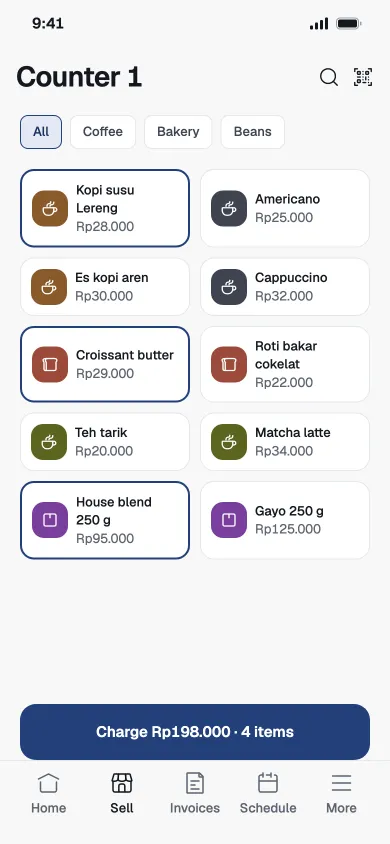
- No. Nota is a made-up back office for small Indonesian businesses: invoices, expenses, payroll, the till, stock, shifts and cash for a coffee roaster, a laundry or a bakery, so the screens show the pattern without copying anyone's brand. Your agent redraws the flow on your own tokens and components.
- How does my agent use this flow?
- Connect Claude Code, Codex or Claude Desktop to Wonderblok over MCP. The agent calls use_pattern for this flow, reads its screens, rules and states, and draws them in your file.
- Is it free?
- Browsing Universe is free. Full pattern notes and use with your agent are part of Pro, and the Free plan opens a few flows in full each month.