MISC FLOW
Filter sheet app flow
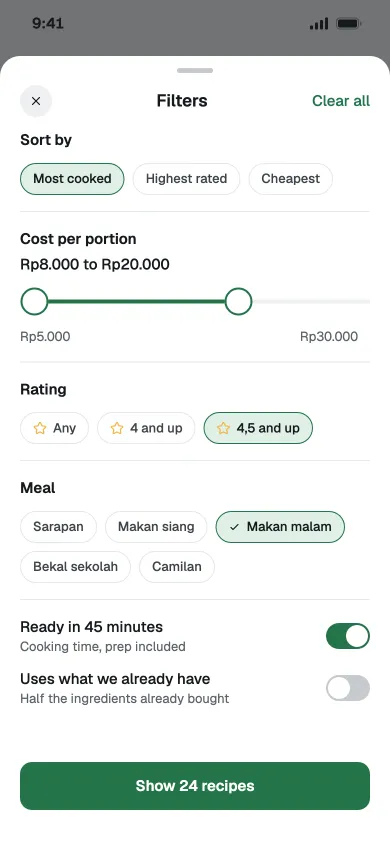
A misc flow in 3 screens, from filters open to zero results warning. Start your app from it, and your agent draws it on your own design system.
- 3 screens
- 3 patterns
- Mobile and desktop
- Brand: Rapi (made up)
The screens, in order
- Filters open
- Applied filtersPro
- Zero results warningPro
See all 3 screens, at mobile and desktop.Pro opens the whole flow in your Universe, with the prompt and code for each screen.
Upgrade to ProAlready Pro? Open in UniverseWhen to use it
USE WHEN
Narrowing a list of dozens or hundreds of items by several facets at once: sort, a price range, a rating, yes or no options and multi-select categories.
AVOID WHEN
One or two filters (put chips over the list), a search for one known item (use search), or filters that change the meaning of the page (use tabs).
Patterns and why they work
3 decisions this flow makes, and the clarity each one buys.
Put the result count on the button: Show 24 recipes tells people what they get before they commit, so they adjust here instead of applying, looking and coming back
Warn about zero before applying: the button turns into No recipes match and the note names the filter to turn off and how many it brings back. A dead end that says how to get out is not a dead end
Show applied filters where the results are: removable chips and Clear all over the list, so people see why the list is short and can undo one filter without reopening the sheet
Each pattern also has its psychology, the intuition behind it and what it rules out, plus layout notes for mobile and desktop.
Open in UniverseStates to cover
The screens people forget until a user hits them.
- Filters open with the live count
- Applied filters as chips with Clear all
- Zero results warned before applying with the filter to loosen
- Plus loading the count while it updates (a short spinner in the button, not drawn)
Pairs with
The flows this one hands off to or comes back from.
More Misc flows
Drawn for the same brand, so they fit together.
Questions
- When should I use a filter sheet flow?
- Narrowing a list of dozens or hundreds of items by several facets at once: sort, a price range, a rating, yes or no options and multi-select categories. Use another pattern for one or two filters (put chips over the list), a search for one known item (use search), or filters that change the meaning of the page (use tabs).
- Which screens does it need?
- This pattern uses 3: Filters open, Applied filters and Zero results warning. Plan for these states too: filters open with the live count, applied filters as chips with clear all, zero results warned before applying with the filter to loosen, plus loading the count while it updates (a short spinner in the button, not drawn).
- Is Rapi a real app?
- No. Rapi is a made-up family lists and chores app: shared groceries, chores and reminders for one household, so the screens show the pattern without copying anyone's brand. Your agent redraws the flow on your own tokens and components.
- How does my agent use this flow?
- Connect Claude Code, Codex or Claude Desktop to Wonderblok over MCP. The agent calls use_pattern for this flow, reads its screens, rules and states, and draws them in your file.
- Is it free?
- Browsing Universe is free. Full pattern notes and use with your agent are part of Pro, and the Free plan opens a few flows in full each month.